Sign a PDF in the Browser — Without the PDF Ever Leaving Your Machine
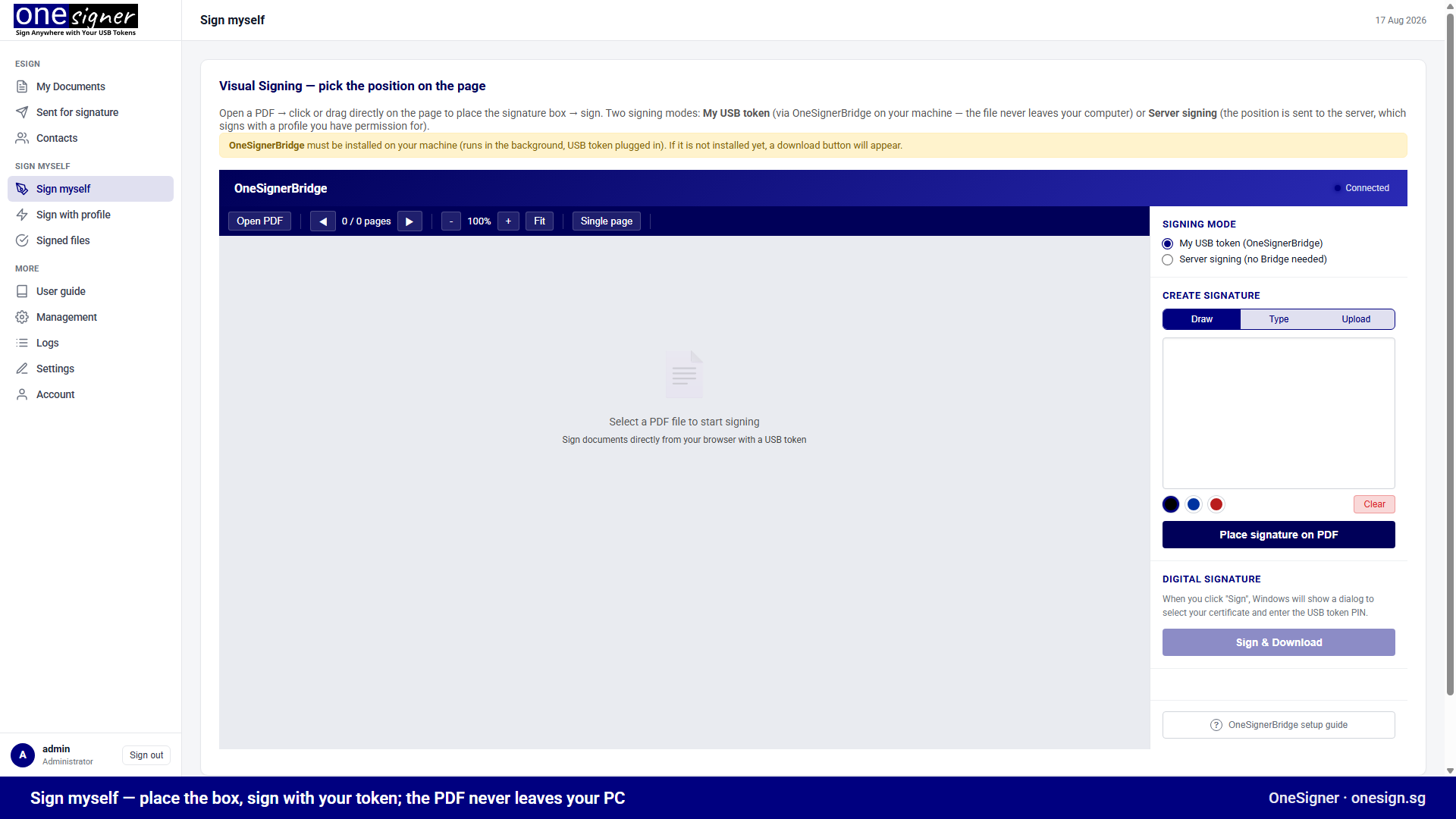
Browser signing tools normally require uploading your document to someone's cloud. OneSigner's Sign myself page does the opposite: the PDF renders locally in your browser, you click exactly where the signature belongs, and your USB token signs it on your own machine. The file never crosses the network.
Why This Exists
Signing profiles are perfect for repetitive documents — same layout, same spot, thousands of files. But one-off documents are the opposite: a counterparty's contract today, a government form tomorrow, signature line in a different place every time. Automating position rules for those is wasted effort; what you want is to point at the spot.
How It Works
- Install OneSignerBridge once — a small background helper. It exposes a secure local WebSocket (
wss://localhost:9505) that the portal page connects to; the page shows Connected when it's ready. - Open the portal → Sign myself → Open PDF. The document renders with pdf.js — locally.
- Create your visible signature (draw, type or upload; choose ink colour) and click or drag on the page to place it. A ghost box follows your cursor; resize with the handle.
- Click Sign & Download. Windows shows the certificate picker and PIN dialog; the token computes the signature; the signed PDF downloads.
The signature is a standard PAdES digital signature under your personal certificate — verifiable in Adobe Acrobat by anyone, no OneSigner needed on their side.
The Privacy Property
In Bridge mode the document is processed entirely client-side: rendering, hashing and signature embedding happen in your browser and Bridge; the token signs the hash. For confidential contracts this is a materially different security posture from any upload-to-cloud signer.
Two Modes, One Page
| My USB token (Bridge) | Server signing | |
|---|---|---|
| Whose certificate | Yours, on your token | A server profile's (e.g. company seal) |
| Where signing happens | Your machine | The OneSigner server |
| PDF leaves your machine? | No | Position + file go to the server |
| Requires Bridge installed | Yes (one-time) | No |
The Same Bridge Powers eSign
When you send documents for signature, recipients who hold their own tokens sign through exactly this mechanism — personal digital signatures in a sequential multi-signer workflow, with the same "key never leaves the token, file never leaves the machine" guarantees.
For Developers
Everything the visual page does is available programmatically: fixedPage/fixedX/fixedY position overrides on the signing API, text-search and page-render helper endpoints. See the Positional Signing API.
Visual signing documentation → · Try it free →
Related: This is one route of several. Six ways to sign with one OneSigner machine lays out the rest.