Sign 300 Invoices a Day Without a Human: Folder-Watch Tutorial
One of the support tickets that led us to build OneSigner came from a finance team: one document-signing token, three hundred invoices a day, and one person typing the PIN into a dialog box all afternoon. This tutorial removes that person from the loop entirely — in about fifteen minutes, with no code.
What we are building
Your accounting system already exports PDF invoices to a folder. We will make every PDF that lands there come back digitally signed with the company's certificate — automatically, timestamped, and logged.
Step 1 — Token and PIN, once
Plug the document-signing token (ePass2003, SafeNet, …) into the OneSigner machine, open the GUI, and store the PIN. It is encrypted on that machine; from now on nobody types it again.
Step 2 — A PDF profile for invoices
Create a signing profile: pick the certificate by thumbprint, set the visible appearance (company name, reason, logo) and position — bottom-left of page one is the usual invoice spot — and the timestamp server your CA provides.
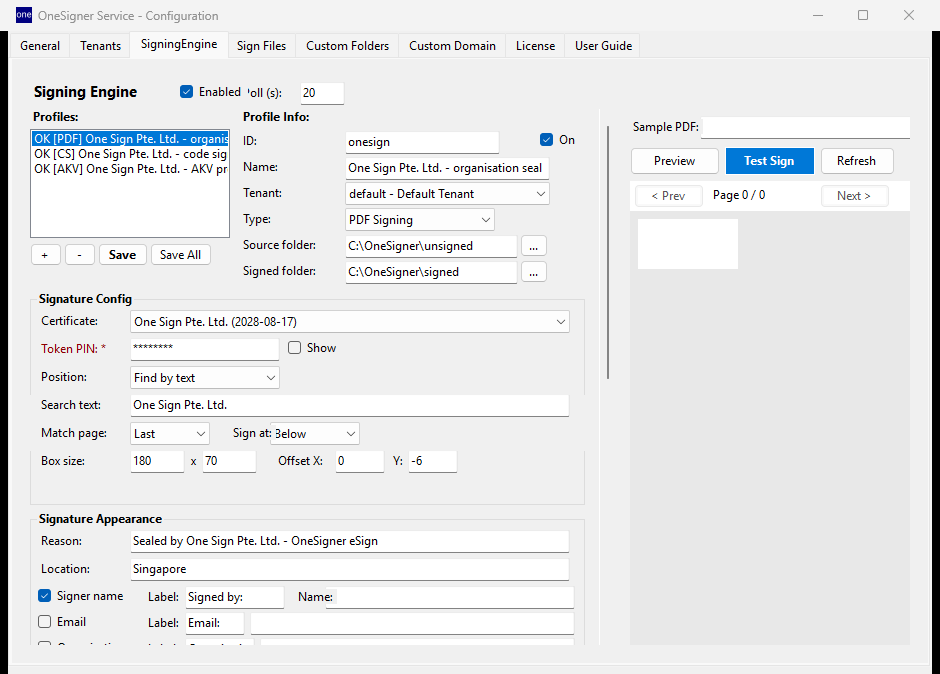
Step 3 — Point the folders at your ERP
Set the profile's source folder to the folder your ERP already exports into (a network share works — polling catches files the change-watcher misses). Choose the output folder your archive or email robot reads from. That's it: export → signed → archived, no human in between.
Step 4 — Verify one invoice
Drop a test PDF in, open the result in Adobe Reader, and check the signature panel: certificate correct, timestamp present, document unmodified. With an AATL-chained certificate you get the green "Signature valid" tick; with your national CA's certificate, validity under your local e-transaction law.
Scaling up
- Hundreds per hour: files queue and sign sequentially per token; the log records each one. A second token and profile doubles throughput.
- Multiple companies: one tenant per entity keeps folders, tokens and API keys isolated — see the multi-tenant guide.
- Prefer an API call? The same profile answers
POST /api/upload?download=true— send the invoice, get the signed bytes back in the response.
Total cost after setup: zero per invoice — no per-seal fees, no monthly meter. That was the point. Free 30-day trial, every feature unlocked.