A DocuSign Alternative Where Signers Use Their Own USB Tokens
E-signature subscriptions have a structural problem: you rent the workflow, the vendor keeps your documents, and the "signatures" are usually just images plus an audit PDF — your company's actual digital certificates on USB tokens never enter the picture. OneSigner eSign flips all three: self-hosted workflow, your documents on your server, and real cryptographic signatures — including each signer's own hardware token.
Same Workflow You Expect…
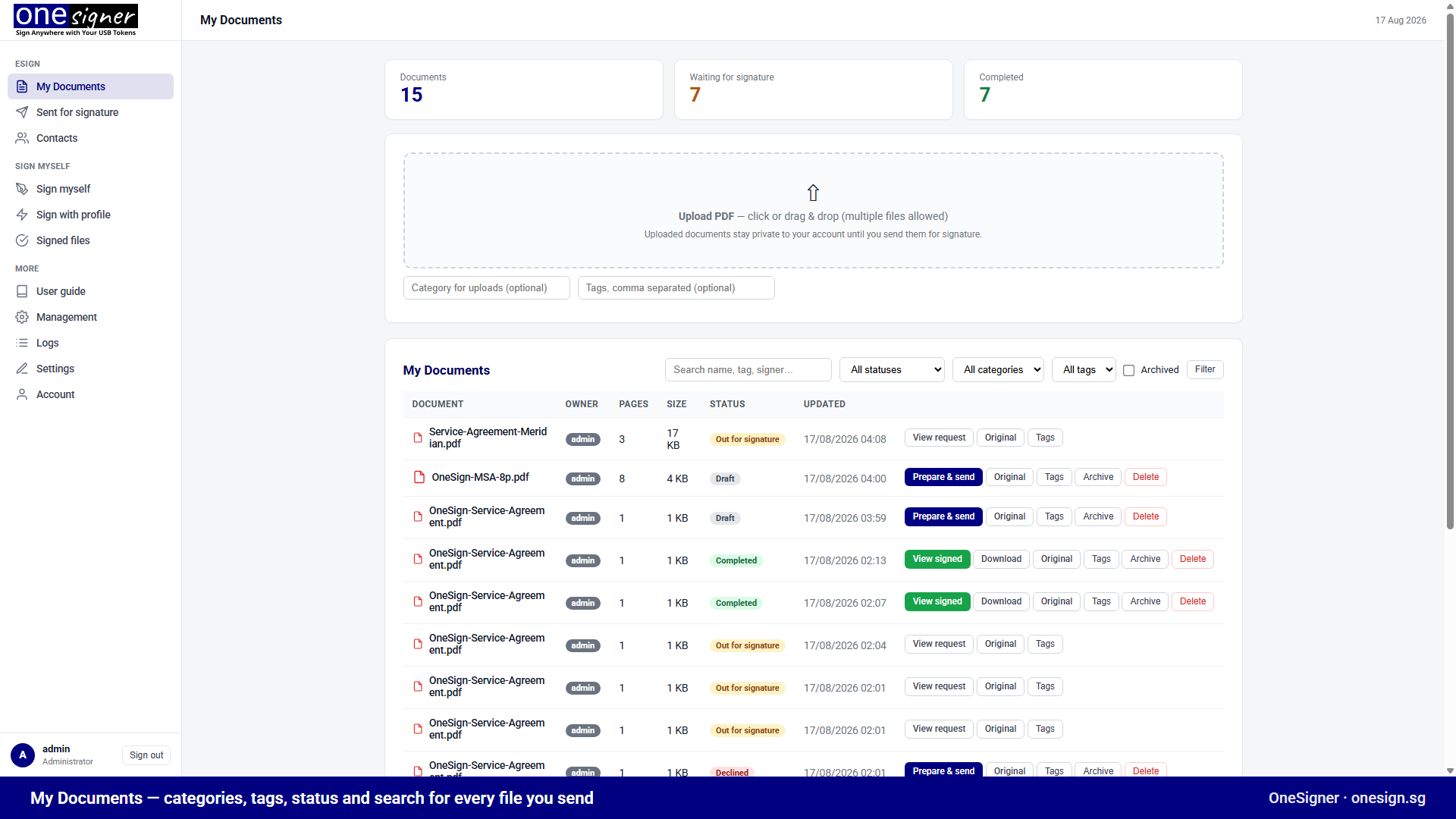
- Upload PDFs, organise with categories and tags.
- Drag-and-drop field builder: Signature, Text, Checkbox, Radio, Select — per signer, colour-coded.
- Multiple recipients signing sequentially via email links — no signer accounts, optional access codes.
- Templates, bulk send, automatic reminders, expiry, decline with reason, edit-before-first-signature, clone & re-send.
- Your logo and colours on the portal, signing pages and every email.
- Complete audit trail: sent, viewed, access-code attempts, field values, certificates used — timestamped with IPs.
…With Three Differences That Matter
1. Signatures are real digital signatures
Every completed document carries PAdES digital signatures verifiable in Adobe Acrobat. Choose per signer:
- Personal token signature — the signer signs with their own certificate via the free OneSignerBridge helper. The private key operation happens on their machine, in their token. How far that carries legally is set by the signer's own certificate and device: an advanced electronic signature (AdES) in every case, and a qualified one (QES) where the certificate is qualified and the token is a QSCD.
- Electronic + organisation seal — signers without tokens draw or type; the server then seals the document with your organisation's certificate, preserving cryptographic integrity.
2. Documents never leave your infrastructure
The portal runs on your Windows server. Contracts, HR files and board papers stay in your jurisdiction, under your backup and retention policies — no processor agreements with an e-sign cloud needed.
3. You buy it once
No per-envelope fees, no per-user seats, no annual ransom. A perpetual license covers the eSign portal and OneSigner's automated PDF and code signing. The subscription you cancel pays for it within months.
What the Signer Sees
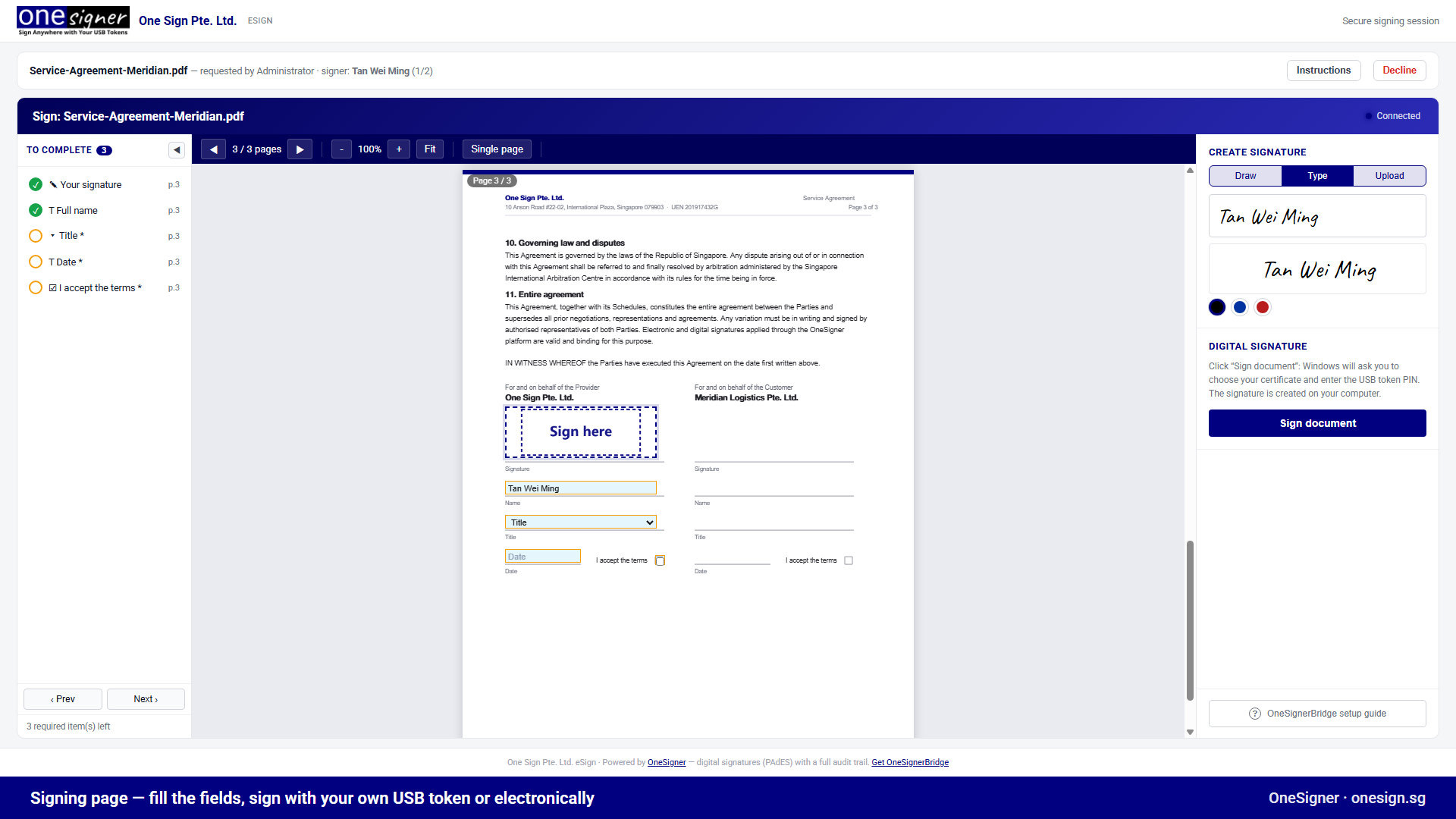
A clean branded page: checklist of required fields, the document rendered in the browser, draw/type/upload signature, one Sign button. Token holders get the Windows certificate prompt via the Bridge; everyone else signs in seconds with nothing to install.
Honest Caveats
- It runs on a Windows machine you manage (a small VM is plenty). If you can't host anything, SaaS remains the fit.
- Signers on the personal-token path must be on Windows with the Bridge installed — electronic signing works everywhere.
eSign portal documentation → · Try it free for 30 days →
Related: Weighing this against the usual suspects? OneSigner vs. the alternatives is our own honest comparison.