Azure Key Vault Proxy (Remote Signing)
The Azure Key Vault Proxy makes your OneSigner server look like an Azure Key Vault to signing tools. AzureSignTool — and OneSigner's own OneSignTool — can then sign binaries remotely while the private key stays on your USB token. Same workflow as cloud HSM signing, zero per-signature fees, no vendor lock-in.
How It Works
- The build machine runs
OneSignTool sign -kvu https://your-server ...(or AzureSignTool with the same flags). - The tool computes the file's digest locally and calls the Key Vault-compatible REST endpoints on your server. Only the hash is transmitted — never the file.
- The server signs the hash with the USB token (SafeNet CSP or direct YubiKey PIV, including ECDSA P-256/P-384) and returns the signature.
- The tool assembles the Authenticode signature and timestamps it.
Configure in the GUI
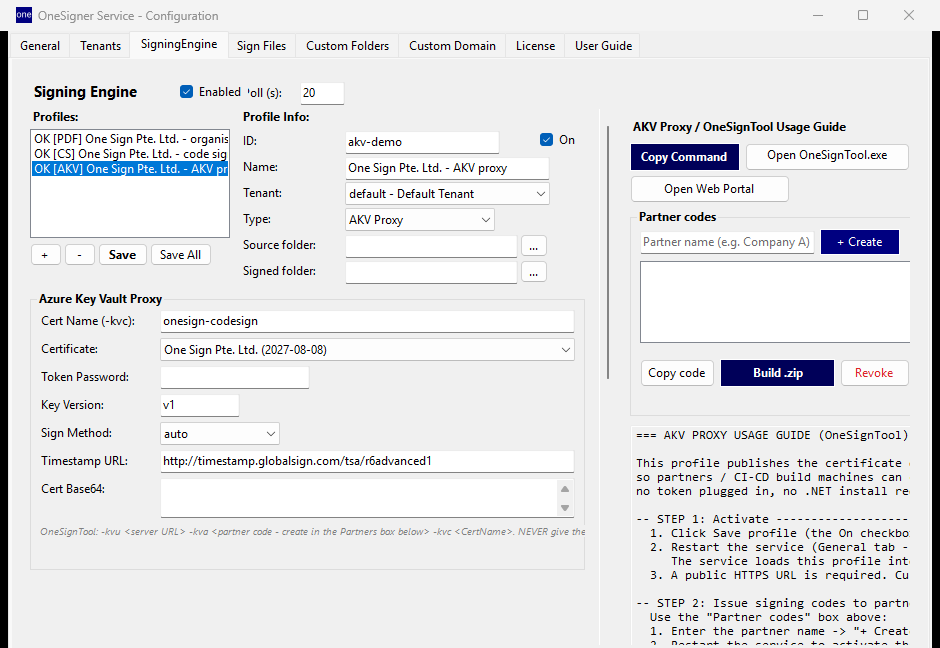
- OneSigner Configuration → SigningEngine tab → add a profile with type AKV Proxy.
- Set:
- Cert Name (-kvc) — the logical name clients pass, e.g.
my-codesign. - Certificate — the token certificate to publish.
- Token Password/PIN — saved in the mapping for unattended signing.
- Sign Method —
auto(recommended),yubikey(direct PIV) orcsp(Windows CSP). - Timestamp URL — default TSA for clients.
- Cert Name (-kvc) — the logical name clients pass, e.g.
- Save the profile and restart the service — the proxy endpoints are now live on your server URL.
Partner Signing Codes
Instead of sharing your admin token, issue each partner or pipeline its own signing code (the Partner codes panel on the AKV profile). Codes are passed as -kva, can be revoked individually, and the Build .zip button produces a ready-to-use client bundle for the partner. Every signing operation is logged with the code that performed it.
Client Usage
# OneSignTool (bundled with OneSigner, single exe)
OneSignTool sign -kvu https://sign.yourcompany.com -kva PARTNER_CODE \
  -kvc my-codesign -fd sha256 -tr http://ts.ssl.com -td sha256 myapp.exe

# AzureSignTool works identically
AzureSignTool sign -kvu https://sign.yourcompany.com -kva PARTNER_CODE \
  -kvc my-codesign -fd sha256 -tr http://ts.ssl.com -td sha256 myapp.exe
ECC certificates: for an ECDSA certificate the proxy reports the correct key type and curve (e.g. P-384) — use the matching digest, e.g. -fd sha384.
Security Controls
- HTTPS via Cloudflare Tunnel — never expose the raw port to the internet.
- Per-partner codes — one credential per consumer, individually revocable.
- IP allowlist — optionally restrict which addresses may call the proxy (localhost is always allowed).
- Thumbprint allowlist — optionally pin exactly which certificates may be used for code signing, server-wide. See License & Signing Security.
- Audit logging — every signature request is logged with timestamp, requester and certificate.
Troubleshooting
- Certificate not found: the
-kvcname must match the profile's Cert Name exactly; token plugged in on the server. - 401/403: wrong or revoked
-kvacode; or IP not in the allowlist. - Wrong algorithm errors with ECC: match the digest to the curve (P-256 → sha256, P-384 → sha384).
Full CLI reference and CI examples: OneSignTool CLI — Remote Code Signing Guide.