Automate Code Signing in CI/CD Without Cloud HSM
Every modern CI tutorial assumes you'll subscribe to a cloud signing service. You don't have to. Here's the reference architecture for fully automated Authenticode signing with a USB token you own — including cloud-hosted runners that can't see your LAN.
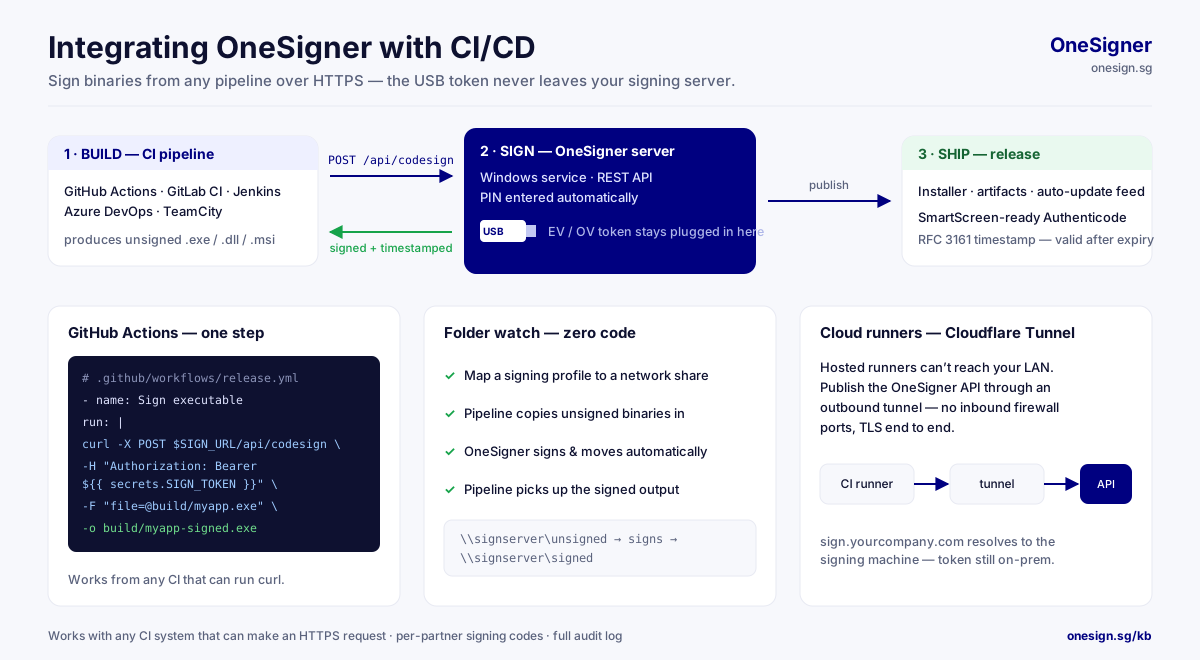
The Architecture
CI pipeline (GitHub Actions / Jenkins / GitLab / Azure DevOps)
   │  build EXE / DLL / MSI
   ├─ Option A: POST binary to OneSigner API  ──► signed binary returned
   ├─ Option B: OneSignTool sends file HASH  ──► signature returned
   └─ Option C: copy to watched share        ──► signed file appears
                        ▼
        OneSigner server (Windows, USB token attached)
        · PIN stored encrypted · auto-logon session · audit log
Option A: Upload API — Simplest
- name: Sign build
  run: |
    curl -sf -X POST "https://sign.example.com/api/upload?download=true" \
      -H "Authorization: Bearer ${{ secrets.ONESIGNER_TOKEN }}" \
      -F "file=@dist/myapp.exe" -o dist/myapp.exe
One HTTP call: upload, sign, download. Works from any runner, any OS.
Option B: OneSignTool — Binary Never Leaves the Runner
OneSignTool sign -kvu https://sign.example.com -kva %SIGNING_CODE% ^
  -kvc ev-cert -fd sha256 -tr http://ts.ssl.com -td sha256 dist\myapp.exe
AzureSignTool-compatible flags; only the digest is sent to the server. Best for large installers and stricter data policies. Issue each pipeline its own revocable signing code. Reference →
Option C: Watched Folder — Zero Code
Point the code-signing profile's source folder at a network share; the pipeline copies files in and collects signed output. No HTTP, no tooling — just file copies.
Reaching a Home/Office Server From Cloud CI
Enable OneSigner's built-in Cloudflare Tunnel (Custom Domain tab): the server gets a stable public HTTPS URL with zero inbound firewall ports. GitHub-hosted runners sign against it like any API.
Hardening Checklist
- Per-pipeline credentials (tenant tokens / partner signing codes) — revocable individually.
- Thumbprint allowlist so the server signs only with intended certificates.
- Defender pre-scan enabled on the profile — never sign what you haven't scanned.
- Timestamps always on; treat TSA failure as retry-then-fail, not skip.
- Monitor
GET /api/signing/status; alert onlastError. - Auto-logon configured so patch-night reboots don't strand the token session.
Real-World Throughput
The token's cryptographic operation is the serial step (~a few seconds); everything else parallelises. Batches of a dozen artifacts finish in seconds — comfortably inside any pipeline budget, with zero marginal cost per signature.
Full CI/CD integration guide → · 30-day trial →
Related: For the requirements behind this setup, including the CA/Browser Forum hardware rule and the OV versus EV comparison, see the EV code signing guide.