Code Signing in CI/CD Pipelines
Builds happen many times a day; your EV token sits in one machine. OneSigner bridges the two: the token stays safely plugged into your signing server, and pipelines sign over HTTPS. Three integration patterns, from simplest to most flexible.
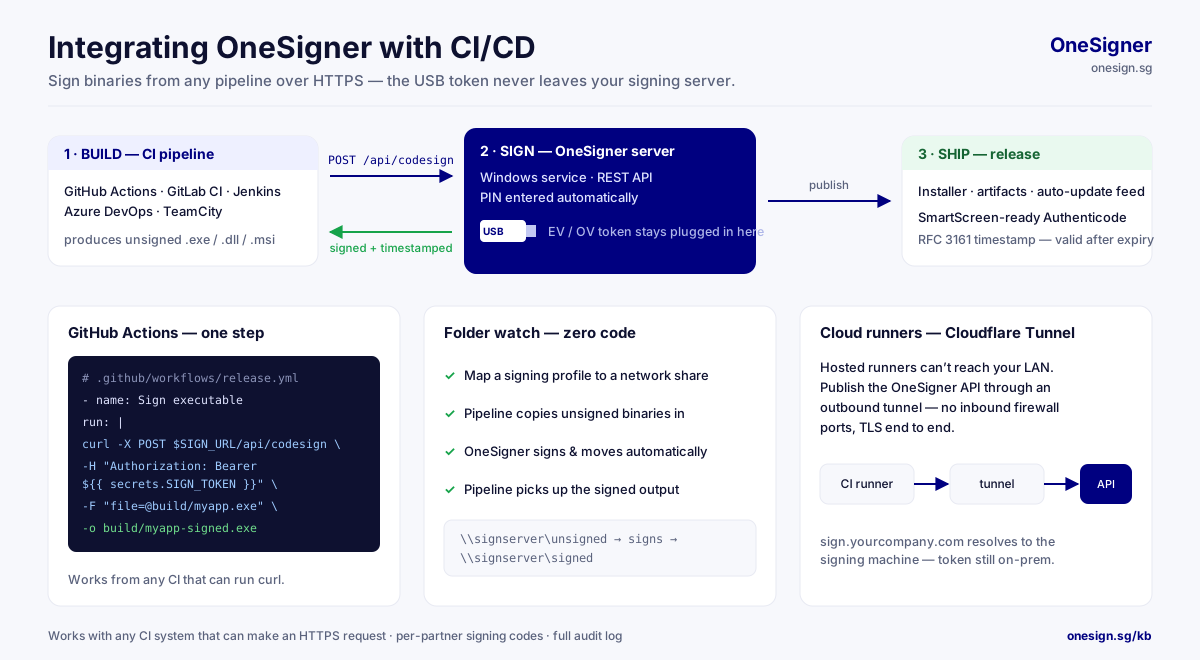
Pattern 1: Upload & Sign API (One Call)
# Upload, sign, download the signed binary — single request
curl -X POST "https://sign.yourcompany.com/api/upload?download=true" \
  -H "Authorization: Bearer $ONESIGNER_TOKEN" \
  -F "file=@build/output/myapp.exe" \
  -o build/output/myapp-signed.exe

# Or explicitly via the codesign endpoint (optionally pinning a profile)
curl -X POST https://sign.yourcompany.com/api/codesign \
  -H "Authorization: Bearer $ONESIGNER_TOKEN" \
  -F "file=@build/output/myapp.msi" \
  -F "profileId=codesign-main" \
  -o build/output/myapp-signed.msi
GitHub Actions example:
- name: Sign executable
  run: |
    curl -sf -X POST "https://sign.yourcompany.com/api/upload?download=true" \
      -H "Authorization: Bearer ${{ secrets.ONESIGNER_TOKEN }}" \
      -F "file=@build/output/myapp.exe" \
      -o build/output/myapp.exe
Pattern 2: OneSignTool (AzureSignTool-Compatible CLI)
If your pipeline already uses AzureSignTool syntax — or you want signtool-style flags with a remote token:
OneSignTool sign -kvu https://sign.yourcompany.com -kva $SIGNING_CODE \
  -kvc my-codesign-cert -fd sha256 -tr http://ts.ssl.com -td sha256 myapp.exe
Only the file hash travels to the server — the binary never leaves the build machine. Per-partner signing codes let you give each pipeline its own revocable credential. Full reference: OneSignTool CLI Guide.
Pattern 3: Folder Watch Over a Network Share (Zero Code)
- Map the code-signing profile's source folder to a network share.
- The pipeline copies unsigned binaries to the share.
- OneSigner signs automatically and moves output to the destination share.
- The pipeline picks up the signed files.
Reaching the Server From Cloud CI
GitHub-hosted or cloud runners can't reach your office LAN. Enable the built-in Cloudflare Tunnel (Custom Domain tab): your OneSigner instance gets a stable public HTTPS URL with no open inbound ports, no VPN.
Making It Unattended-Proof
- Token PIN stored (encrypted) in the profile — no PIN dialogs.
- Auto-Logon enabled — the interactive session USB tokens require survives reboots and patch nights.
- Timestamps on — releases stay valid after certificate expiry.
- Defender pre-scan option — refuse to sign flagged binaries.
- Thumbprint allowlisting — optionally lock the server to sign only with specific certificates. See License & Signing Security.
Failure Handling Tips
- Treat non-2xx responses as build failures (
curl -sf); OneSigner returns clear JSON error messages. - Timestamp server hiccups are the most common flake — configure a reliable TSA and retry once on failure.
- Watch
GET /api/signing/statusfrom monitoring to catch token-unplugged or session-lost conditions before release day.
Related: Still deciding between a USB token and a rented cloud HSM for your pipeline? The EV code signing guide works through the three-year cost of each.